







At the center of the house

Every system in your home runs through one network

Lighting, music, TVs, cameras, the doorbell, the car in the garage — they all lean on the same network. Make it strong, and everything around it just works.

Speed vs. design

A faster plan won’t fix a weak network

Your internet provider sets the ceiling. The network inside the house decides what every room actually gets.

  • The usual fix

    Buy a faster plan

    When the Wi-Fi struggles, the usual answer is to upgrade the internet plan. Think of your provider as the on-ramp and your home network as the highway. A wider on-ramp doesn’t help when the highway runs out halfway down the hall.

    For most homes, a plan in the 300 to 500 Mbps range is plenty. Past that, the plan is rarely what’s holding things back. Here’s the math on how much internet speed you need.
  • What we do

    Design the network around the house

    We start with the floor plan: what the walls, floors, and appliances will block, which devices never move, and where people actually use their phones. Then we wire what we can and place access points where the house needs them.

    The result is the same connection in the back bedroom as next to the router, and a network that holds up when everyone is home at once.

A well-designed network on a “slow” plan will almost always beat a poor network on a fast one.

Paying for fast internet and still finding dead zones?

Have us look at your network

Coverage, planned

We map the Wi-Fi before anything goes on the ceiling

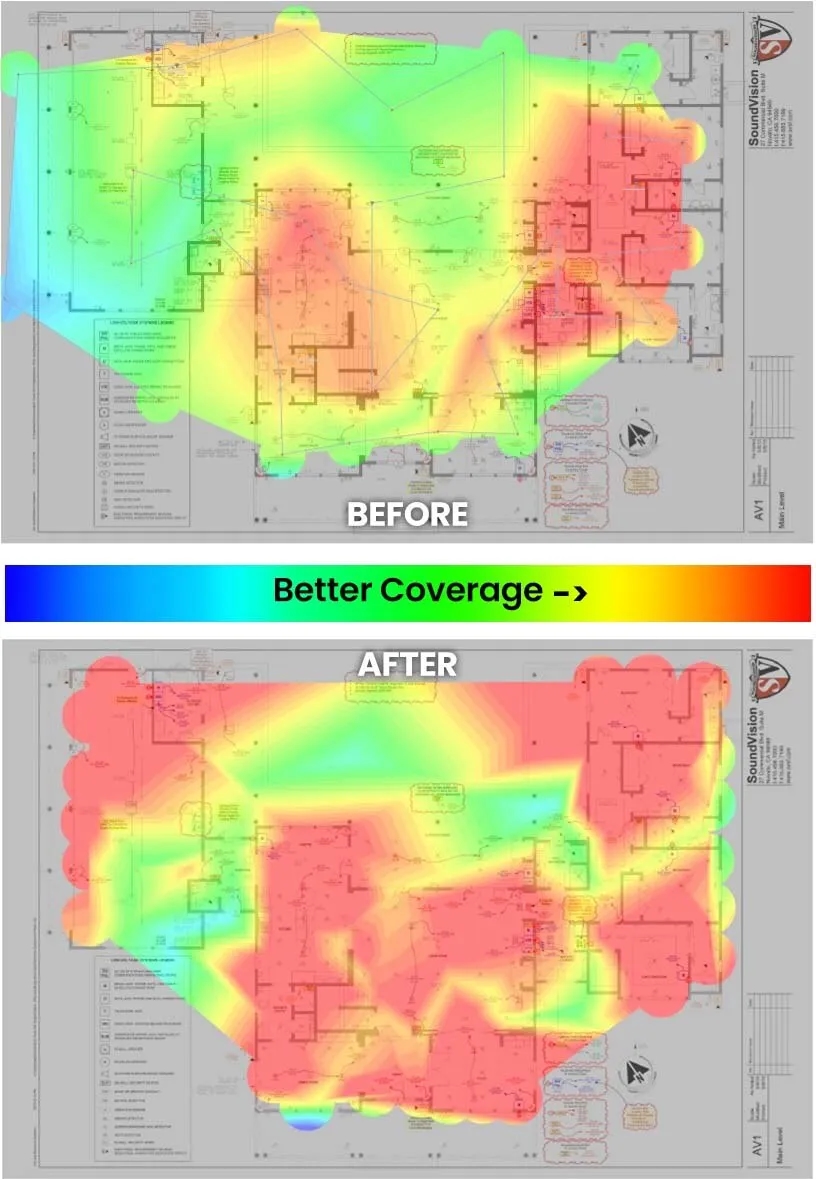
Access points go where the floor plan needs them, not where a square-footage rule says. We model coverage on your drawings, account for what each wall and floor will block, and place every access point on purpose.

Here’s one home, before and after. Red is the strongest signal.

Wi-Fi heat maps of a home’s floor plan before and after, with the coverage gaps filled in after the redesign

Backup internet

Even a reliable provider goes down

A 99% reliable connection is still down about88hours a year

Bay Area outages are common: a storm, a cut line, a fallen tree. A second connection only helps if it doesn’t fail for the same reason, so we pair one wired provider with one wireless provider, such as Starlink or 5G.

A dual-WAN router watches both. When the main line drops, the backup takes over on its own, and most people never notice. Two independent lines turn about 88 hours of downtime a year into less than one.

Paying for two providers isn’t a backup by itself. It has to be set up to fail over.

Not sure your internet would ride out the next outage?

Ask about backup internet

What runs on it

When the network goes down, all of this goes with it

Most of the technology in a home quietly depends on one connection.

  • Lighting & shades

    Keypads keep working on their own, but the app, voice control, remote access, and anything that ties lights and shades to the rest of the house depend on the network.

  • Whole-home audio

    Streaming services, grouped rooms, and the app on your phone all ride the network. Wired players keep rooms in sync and keep music from cutting out.

  • TVs & streaming

    A single 4K stream uses about 25 Mbps. We wire every TV that doesn’t move, so movie night never waits on Wi-Fi.

  • Security cameras

    Twenty cameras are a steady 100 Mbps. Cameras get their own wired runs, so recording never competes with the rest of the house.

  • Video doorbell

    Doorbells sit at the edge of the house, often behind stucco or metal. Coverage at the front door is planned, not hoped for.

  • Cars & EV charging

    Chargers and cars pull schedules and updates from the garage, a room full of metal that most networks forget. We cover it on purpose.

  • Phones & tablets

    Phones are how most people run the lights, music, and cameras. They should hand off between access points without a hiccup as you walk through the house.

  • Computers & work

    Home offices get a wired connection. Calls stay clear, and large uploads and cloud backups run without slowing down the rest of the house.

White patch cables looped into a network switch above a power conditioner in an equipment rack

How we build it

Wired where it counts, wireless where it has to be

In 28 years of home technology work, most of the Wi-Fi problems we’re called about come down to the same few decisions. We make them on purpose.

  • Wire what doesn’t move

    TVs, speakers, desks, and cameras get their own ethernet runs, with their Wi-Fi switched off. That leaves the air for the phones and laptops that actually move.

  • Place access points by the plan, not the square footage

    We look for what the house will block — floors, metal, kitchens, garages, laundry rooms — and design around it. Each floor gets its own coverage, and we don’t add more access points than the house needs, because too many cause problems of their own.

  • One switch, a cable to every access point

    Every access point gets an unbroken cable back to the same switch. Mesh and extenders are a last resort, because each wireless hop adds lag and dropped connections.

  • Commercial-grade, labeled, and documented

    Commercial-grade equipment in a labeled rack, with the drawings kept on file. When something needs attention years from now, we know exactly what’s there.

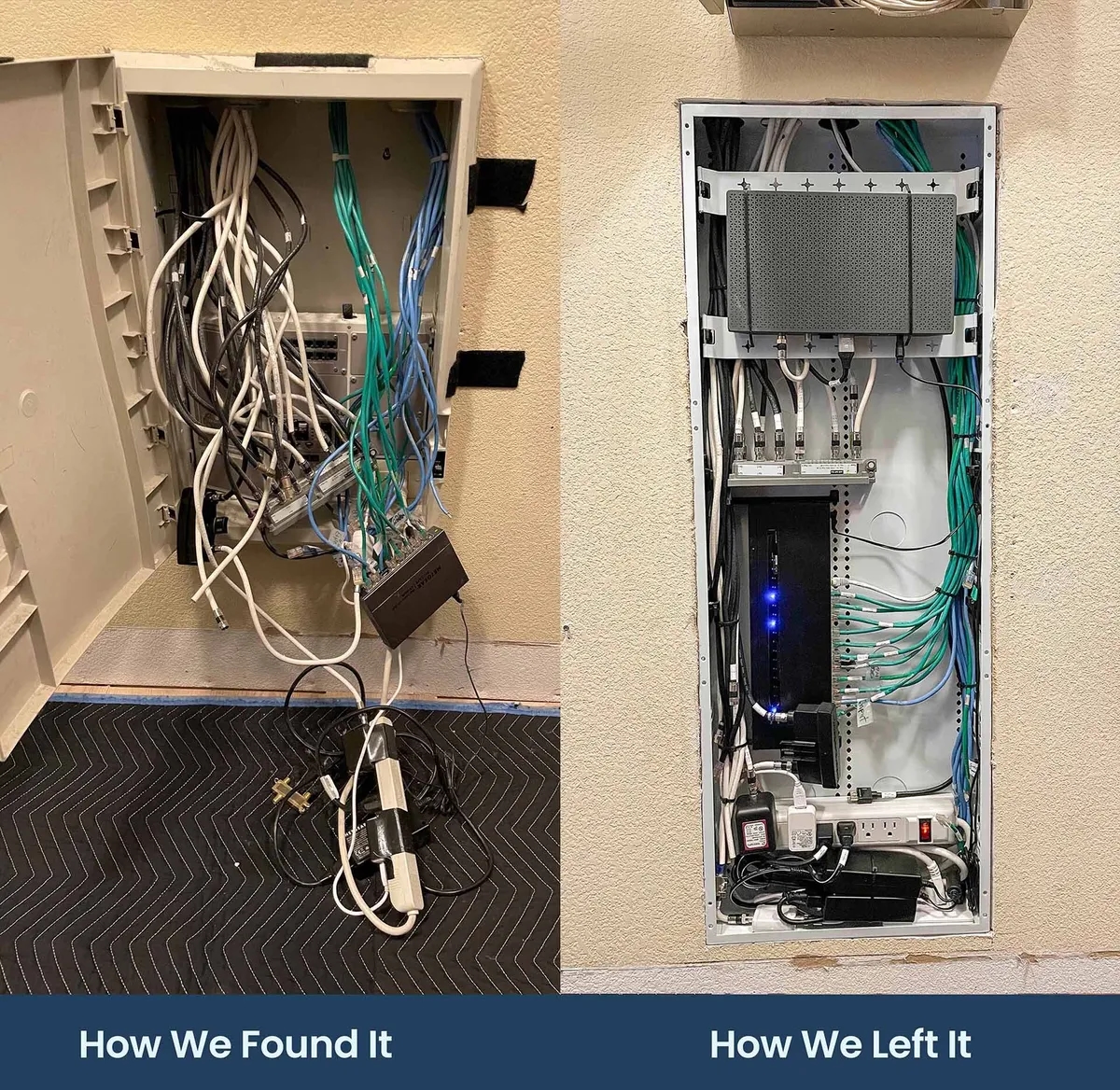
A home network enclosure before, with tangled cables spilling out, and after, rebuilt with labeled, dressed wiring

Already moved in?

When the walls are open, we pull extra ethernet for later. When they’re closed, we work with the wiring you have and fill the gaps with well-placed access points.

And whatever we find in the equipment closet, we leave it labeled, dressed, and documented.

Serving

  • San Francisco
  • Marin
  • Sonoma
  • Napa
  • Alameda
  • San Mateo

From our clients

What homeowners say

A few words from recent projects.

“Very professional, knowledgeable and reliable! Also very tidy! Made the whole process painless!”
Shannon Alten

Shannon Alten

SoundVision

“…Loren did a very through walkthrough of our new house, didn’t try to sell me on anything I wasn’t looking for, spec’d and priced out the job very reasonably. The work was done exactly as defined, and we’ve…”
John Berkley

John Berkley

SoundVision

“…They worked closely with the contractors from the beginning. They are very professional, efficient and deliver quality work. Very dependable, and with great knowledge in AV. Excellent shop.”
Eric Chen

Eric Chen

SoundVision

“The best audiovisual company out there, period! From start to finish they made the process easy and we ended up with a fantastic Smart Home! Thanks to Scott, Brian, Albert, David and the rest of the team,…”
Captainloz

Captainloz

SoundVision

“…Loren did a thorough assessment and his technicians installed new equipment, cleaned up the old wiring, and our WiFi is excellent in every room. They came back a week later to make sure everything was…”
David Fariello

David Fariello

SoundVision

“…The process could not have gone more smoothly. JP and Emil were professional, efficient, friendly, and extremely helpful and patient running us through the paces of using the system. We are delighted!”
William Hartman

William Hartman

SoundVision

Ready for Wi-Fi you never have to think about?

Plan your network

FAQ

Home network questions

Start with the foundation

Build the network first, and everything else gets easier

Tell us about the house, the internet you have today, and where things fall short. We’ll design a network the rest of your home can count on.

Request a consultation

Tell us about your home

Share a few details and we will be in touch within one business day.

We design for homes across San Francisco, Marin, Sonoma, Napa, Alameda, and San Mateo counties.