
Home Networks
Reliable Internet for Large Homes
With the rise of remote work, smart home devices, and high-definition streaming, having a fast and reliable internet connection has never been more essential. This is especially true for large homes, where ensuring seamless Wi-Fi coverage across every room on every floor can be a real challenge.
Having more connected devices or a larger home doesn’t necessarily mean you need higher internet speed. However, it does mean that your home network’s design must be carefully planned to ensure reliable coverage for all your devices.
At SoundVision, we pride ourselves on building networks that ensure near 100% uptime and reliable wireless coverage everywhere you need it. Here are some of the design philosophies we use to ensure quality, high-speed internet throughout even the largest homes.
Your Internet Service Provider Dictates Your Internet Quality
No matter how robust your home network is, your speed can only be as fast as what comes into your home. Internet service providers (ISP) like Xfinity or Sonic are responsible for bringing the internet into your home. The speed you choose to get from them will dictate the speed and quality of the internet throughout your home.
For example, if your home network is designed to support 1,000Mbps, you can’t expect those speeds in your home if your ISP plan only supports 50Mbps. If you’re unsure how much internet speed you should be paying for, check out this article about picking the right ISP plan to ensure you don’t overpay.
Hardwire as Many Devices as Possible
Large homes tend to have more devices: TVs in multiple rooms, desktop computers, security cameras, smart home gear and more. One great strategy is to provide hardwired internet for stationary devices, which alleviates the load on your wireless network.
For example, an access point can more easily provide fast and responsive internet speeds to a single device than when five other devices need to be online.
Turning Off Wi-Fi on Hardwired Devices
This is only effective if you also turn off Wi-Fi on hardwired devices. Even if a device is given hardwired internet, it rarely still needs Wi-Fi. This keeps the airwaves cleaner for wireless devices like smartphones and laptops.
If you’re providing hardwired internet to stationary devices, it would be smart to wire ethernet to other locations of your home while you’re at it. You may not need an internet connection there now, but you might in the future. It’s always easier to hardwire during remodels or new construction than to tear walls open in a furnished home.
Intelligently Place Wireless Access Points
Wireless access points (WAPs) are the backbone of your home’s Wi-Fi network, responsible for broadcasting a strong and stable signal. However, their coverage is limited, and everyday household elements like appliances, HVAC tubing, and thick walls can weaken their signal. In larger homes, multiple access points are often required to ensure seamless connectivity across all floors and outdoor spaces.
If you’re placing your own access points, a good rule of thumb is one access point for every 1,200 square feet. Never assume access points will provide strong coverage between floors. Just recognize that more access points is not better. There is such a thing as too many access points. The right amount is the perfect balance of coverage while accounting for the home's interferences.
The Role of a Home Integrator In Reliable Home Internet
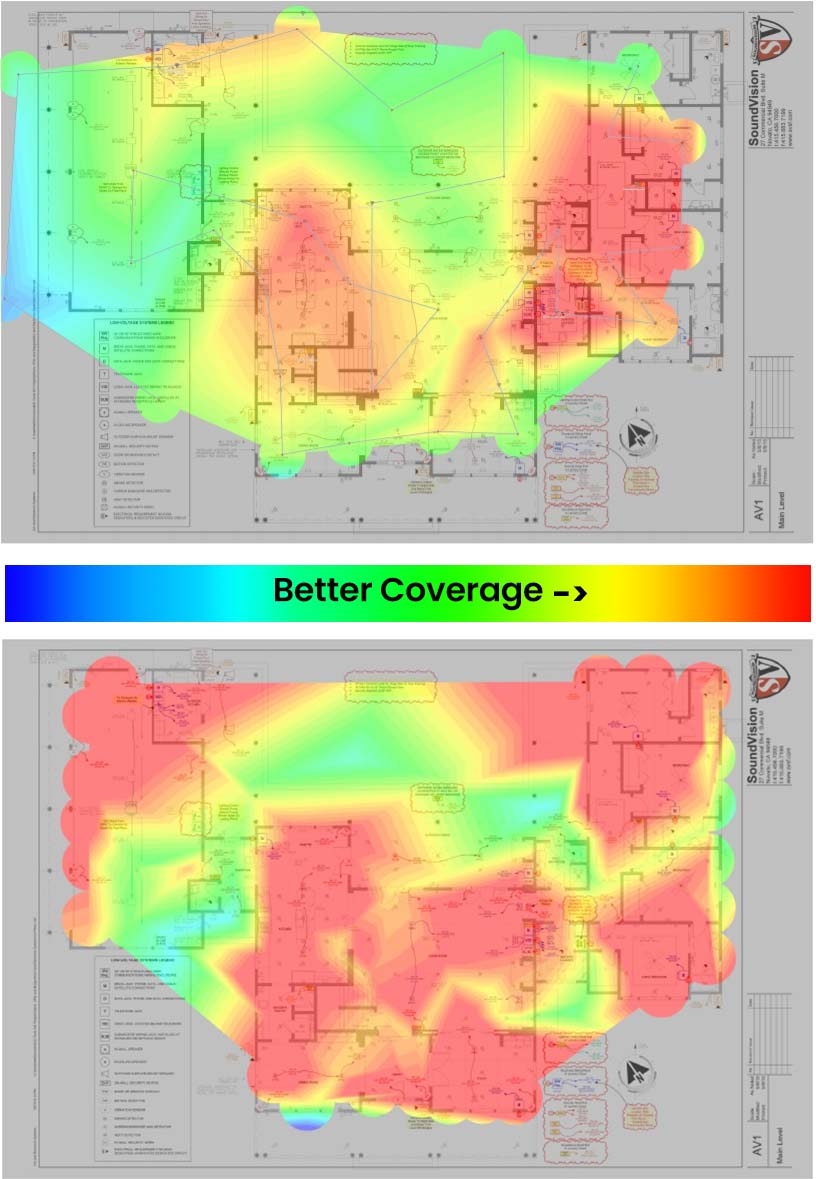
Instead of placing access points based on square footage, the key to a strong and reliable network connection is seeing the layout of a space, preemptively determining where the home would naturally create interference, and designing around those obstacles. This is where an experienced integrator like SoundVision comes into play.
With over 20 years of experience designing home networks in the San Francisco Bay Area, we use advanced tools to map coverage, eliminate weak spots, and fine-tune placement to ensure seamless, high-performance Wi-Fi throughout your home.
Minimize Failure Points in Your Wireless Internet
All your access points should connect to the same network switch to ensure reliability and guarantee good performance. Running a single, uninterrupted ethernet cable between your access point and a network switch makes troubleshooting effortless and minimizes failure points. It would be frustrating if you had an access point not working properly and had to check wire splices behind drywall or chase down intermediary network switches.
Only Use Mesh Networks as a Last Resort
Mesh networks can be tempting. They promise broad coverage and fast speeds without requiring a hardwired connection. However, mesh systems operate like Wi-Fi repeaters. Each time your internet has to hop from one mesh device to the next, the speed degrades. With enough meshes in a large home, you’ll see slow response times and slow network speeds. This is called latency and packet loss, with both contributing to a slow experience.
If hard wiring devices and access points aren’t possible, a mesh system may work for your environment. Just understand the trade-offs in terms of speed, latency, and reliability.
Making It All Work With SoundVision
At SoundVision, we’ve spent more than 20 years refining our approach to home networking. We design your network to handle everything you’ll demand from it: remote work, 4K streaming and more. Whether it’s a 1,000 square-foot ADU or a 7,000 square-foot home, we can help design and install a home network that’s ready for anything you throw at it.
If you want a rock-solid network in your large home or are tired of Wi-Fi dead zones in your large home, give us a call at 415-456-7000 or send us a message. We’ll work with you to build a high-performance, future-proof solution for your San Francisco Bay Area home tailored to your needs.
5 Rules for Creating Strong and Reliable Network
More than ever, it’s crucial to have a strong and reliable network. With more telecommuting, Zoom calls and streaming, our home networks are being put to the test. Soundvision takes into consideration a number of variables to ensure networks have near 100% uptime with house-wide wireless coverage for mobile devices. Here are five things you can do to increase the performance of your network.
1. A Quality Internet Service Provider
No matter how good your local network is, your internet speeds are still limited by your internet service provider, or ISP. Your ISP is the bridge between your home and the internet. Let us pretend networks are roadways. If your home network is as powerful as a 10-lane highway, that doesn’t do you any good if your ISP is only bringing in your internet traffic from a one lane road.
If you do a lot of simultaneous streaming or have other high-demand internet needs, we recommend getting fiber internet. Availability is spotty nationwide. For those without access to fiber, we recommend Comcast to those in the SF Bay Area. Other than fiber connections, no other ISPs offer internet speeds that are competitive with Comcast.
2. Use Wired Connections Whenever Possible
Whenever possible, stationary internet devices should be hardwired. A wired connection ensures a strong connection and consistent bandwidth. Devices like desktop computers, TV’s and security cameras are all great examples of devices that are best off hardwired. This allows wireless access points to focus on delivering internet to mobile devices.
When these devices are hardwired, it’s good practice to turn off their wireless abilities. Keeping it on will create more interference and lowers the performance for the devices connected to wireless.
3. Intelligently Setup Wireless Access Points
Wireless access points are what wirelessly broadcast your internet. If not set up correctly, they can cause more headaches rather than help. By doing so, your device can seamlessly change your connection to a new access point as you start getting out of range of another. It’s also important to realize how many access points you need. A good rule of thumb is that you need one wireless access point for every 1,500 square feet of inside and outside space. This needs to be repeated on each floor because wireless doesn’t travel well through floors. Wireless also doesn’t travel through metal in general, which means it has trouble traveling through appliances.
It’s important to determine the placement of the access point with this in mind. Access points spread wireless internet equally in all directions, so they’re best placed in the middle of spaces. Then you must consider where metal is in the home. Metal acts like a wall for wireless. This means access points must be placed closer to these areas such as garages, kitchens and washrooms.
4. Build a Network That Isn’t Overwhelmed
Sometimes our networks are hit with obstacles that demand special equipment. If you have a lot of wirelessly connecting devices, a standard consumer wireless access point may not be able to handle all the connected devices. In other instances, there is so much wireless interference in urban areas from everyone trying to create their own network that it may be difficult to connect to your own. In both these instances, an enterprise solution is the most optimal solution. Soundvision has over 20 years of experience in the industry. We can help design and create your network suited for your needs, Message us today!
5. Meshes – When You’re Out of Options
Mesh networks are more of a band-aid rather than a solution. They're great when you can’t hardwire multiple access points and can’t hardwire a lot of devices. Meshes work by creating a “web” in the air. If you’re trying to access the internet, the closest mesh will take the request. That mesh isn’t an access point, so it hands it off to the next mesh, and the next and the next until it finally reaches the main network. Because you’re always close to a mesh it gives the perception of a strong network. But all those hands off previously listed leads to high latency and are more prone to packet loss. That means it takes more time just to request data and the data can come in slower.
Start a Conversation
Let’s Talk About Your Home
Tell us a little about your project and we’ll be in touch.